# Layout

1. Acesse o painel Nuvemshop e siga pelo caminho **"Loja Online > Layout > Editar layout"**.
2. No menu lateral, clique em **"Rodapé da página > Layout".**

<figure><img src="/files/ZgWLeYxAlh9eQHL5z0ex" alt=""><figcaption></figcaption></figure>

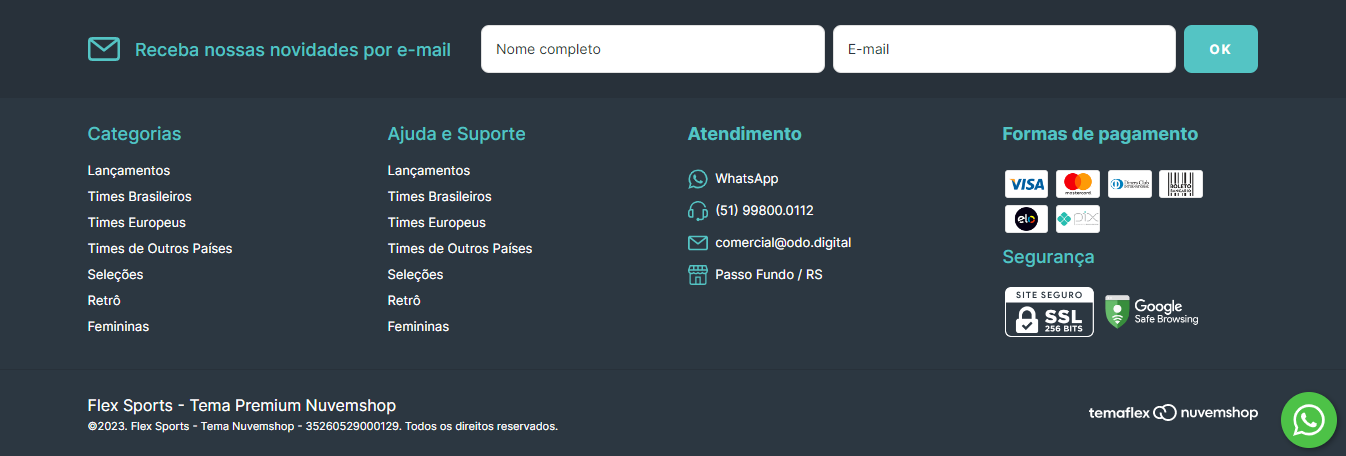
A seleção de **layout do rodapé** vai definir a organização dos elementos no topo da sua loja.&#x20;

Atualmente, o Flex disponibiliza **duas opções de estilos**, conforme abaixo:&#x20;

<figure><img src="/files/qJtVY9rXQHK6MqVXDmjg" alt=""><figcaption></figcaption></figure>

**- 3 blocos com 2 menus:**

<figure><img src="/files/hi9QwKfUA2EX43SzivDu" alt=""><figcaption></figcaption></figure>

**- 2 blocos com newsletter em linha:**

<figure><img src="/files/KHUUAJjZeMYRznncRThL" alt=""><figcaption></figcaption></figure>

Por último, clique em **"Publicar Alterações"** para finalizar.
![](https://static.helpjuice.com/helpjuice_production/uploads/upload/image/7634/direct/1643232327031-1643232327031.png)

**Pronto! 🙌**


---

# Agent Instructions: Querying This Documentation

If you need additional information that is not directly available in this page, you can query the documentation dynamically by asking a question.

Perform an HTTP GET request on the current page URL with the `ask` query parameter:

```
GET https://ajuda.temaflex.com.br/personalizar-layout/rodape-da-pagina/layout.md?ask=<question>
```

The question should be specific, self-contained, and written in natural language.
The response will contain a direct answer to the question and relevant excerpts and sources from the documentation.

Use this mechanism when the answer is not explicitly present in the current page, you need clarification or additional context, or you want to retrieve related documentation sections.